Git (DevOps 5)

Aspiring DevOps engineer with foundational skills in Kubernetes, Jenkins, Maven, Nagios, Docker, Ansible, Chef, Git, and Linux, eager to contribute to automation and efficient system management. On my way to learn terraform and python
Hello everyone,
I am Batool Fatima. I am 18 years old. I have been learning DevOps for a month now. This is my fifth code blog. In last blog, I explained the concepts of branches, Git conflict and Git Stashing . Today, Let's learn about Git Reset, Git Revert and Tags with me.
Git Reset-
Git Reset is the command we use when we want to move the repository back to a previous commit, discarding any changes made after that commit.
To reset staging area we use- git reset <filename> git reset
To reset the changes from both staging area and working directory at a time- git reset --hard (permanently delete)
First, it's always worth noting that git reset --hard is a potentially dangerous command, since it throws away all your uncommitted changes. For safety, you should always check that the output of git status is clean (that is, empty) before using it.
Git Revert-
The Git Revert command helps you undo an existing commit. It leaves the files in the same state as if the commit that has been reverted never existed.
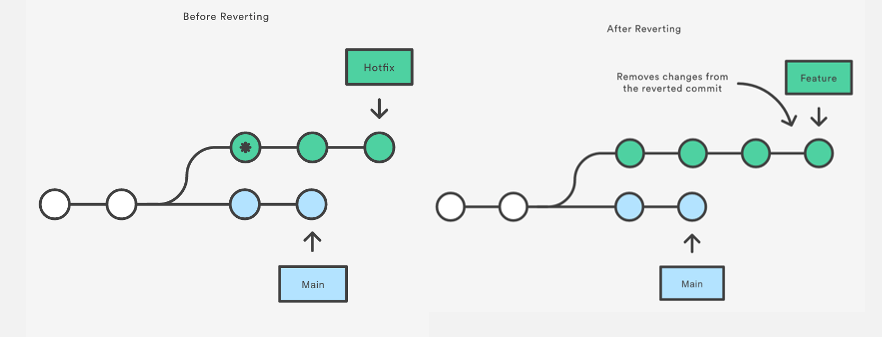
It does not delete any data in this process instead git creates a new commit with the included files reverted to their previous state.
Your version control history moves forward while the state of your file moves backwards.
We use git revert <commit_id> to revert our commit.
A git revert is just another commit, so e.g. push to the remote so that other users can pull/fetch/merge the changes and you're done.
Tags-
Tag option allows to give meaningful names to a specific version of the repository.
You can create tags for GitHub by either using:
the Git command line, or
GitHub's web interface.
To create a tag on your current branch, run this: git tag <tagname>
To see the list of tags, run this: git tag
To see a particular git commit by using tag, run this: git show <tagname>
To delete a tag, run this: git tag -d <tagname>
So, This will be my last blog about Git and Soon I'll write more regarding DevOps from my next blog on some new topic.
Thank You!